

Last Updated: October 27, 2026
This page explains what a Qualified Reviewer is and answers potential questions.
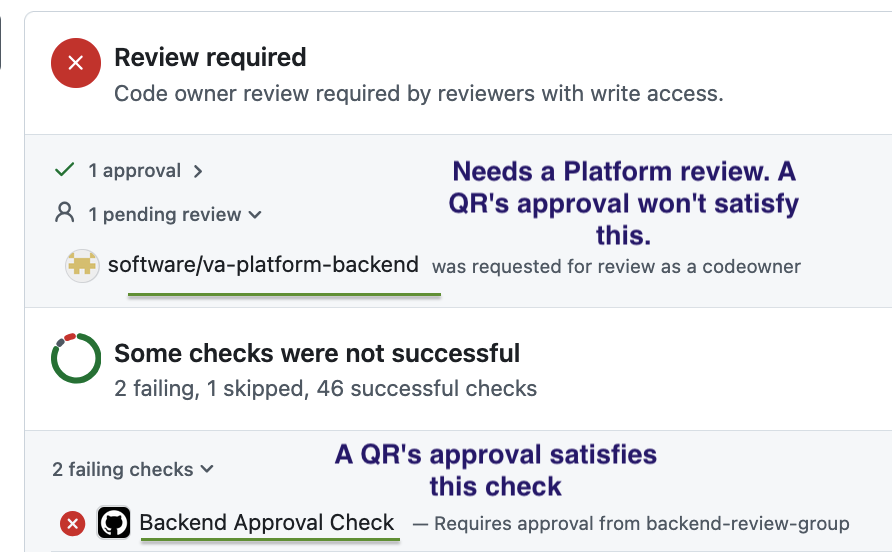
A Qualified Reviewer (QR) is a Product (VFS) engineer with individual authority to satisfy the backend review requirement. They are invited to apply, a Fed engineer signs off, and they are added to backend-review-group. PR approval from a QR clears without a Platform review, unless va-platform-backend is a code owner–that does still require a Platform review.
What do I need to do?
-
Read through this Code Review Checklist. These are common things a Platform reviewer looks for.
-
Read through the Code Review Standards for the approach we want to take while reviewing code.
-
Read the questions and answers below.
Questions & Answers
Whose PRs can I review?
Technically, anyone’s PR. However, the ideal scenario is that you review your team’s PRs. If you get people not on your team asking you for a backend review, we recommend pointing them to #vfs-platform-support, unless you want people blowing up your DMs asking for reviews! You may want to discuss your new reviewing powers with your manager and team to set expectations. We do NOT expect you to take on the burden of reviewing additional PRs beyond your team’s PRs.
Do I need to look out for different things now that I’m a QR?
Yes! The Code Review Checklist lists common things a Platform reviewer looks for. When reviewing with a Platform lens, we prioritize the health, quality, and security of the API. Note: we’re working on a shareable AI Skill to use for reviewing PRs with a Platform lens.
Do my team’s PRs need two approvals still?
Up to you and your team to make that call. Technically, your approval will satisfy your team’s approval plus the backend approval. But no review is perfect, so it’s good to have more eyes, especially if the PR is complex. And remember, you’ll still need approval from any team whose code you modify, including Platform. See the screenshot below for an example of CI:
Can I merge PRs by bypassing CI requirements?
You have the ability to, yes. But please only do this under limited circumstances:
-
If the PR needs to merge ASAP to resolve a veteran-facing defect.
-
If the Danger check is failing on the PR being too big and there’s no reasonable way to break it up.
-
If the PR needs another team’s review and you’ve reached out to the team’s Slack channel or individuals on the team but haven’t gotten a review within ~3 business days.
-
Caveat: Code owned by Identity (
octo-identity), Mobile (mobile-api-team), and Platform (va-platform-backend) really should get reviewed by those teams, so continue asking for a review. -
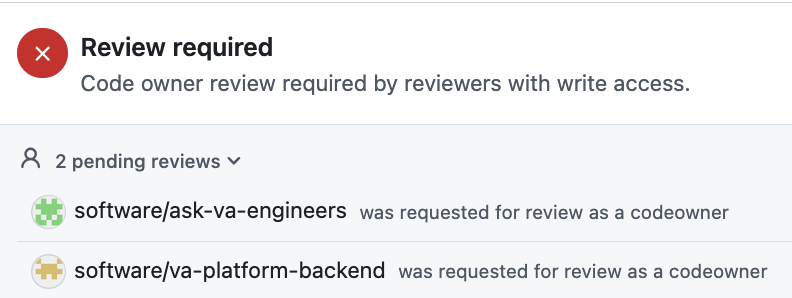
This section shows you which codeowners are needed
-
What if I don’t feel comfortable approving something?
Reach out in #qualified-reviewers and ask for another set of eyes. Don’t ignore your spidey senses! It’s also appropriate to reach out to the Platform backend engineer who’s on support.
Holy cow, I get a million GitHub notifications now that I’m in backend-review-group
You can turn off notifications in GitHub, or create a rule/filter for your inbox.
Oh no. A PR I approved broke something. What do I do?
Panic (😆 kidding). Revert it (or fix it. whichever is faster). This happens, just make sure you’re available to help debug and fix it.
 Restrictions
-
Don’t change repo settings. As a member of the
backend-review-group, you have admin powers for some Platform backend repos, but please don’t make any changes in the Settings tab of these repos. If you think something needs to be changed, reach out in #qualified-reviewers to ask.
Help and feedback
-
Get help from the Platform Support Team in Slack.
-
Submit a feature idea to the Platform.