

Last Updated:
Here, you can find information to get you started with analytics on VA.gov and working with the Platform Analytics & Insights team.
What support does the Analytics team provide?
The Platform Analytics & Insights team offers a variety of analytics support, including:
-
Access to analytics tools: access to Google Analytics & Domo
-
Standardized dashboards: out-of-the-box reports that display the metrics VA cares about
-
VA.gov interaction tracking: Google Tag Manager support to tag and track interactions
-
Office hours: drop-in office hours for in person questions and analytics coaching
What kind of data does the Analytics team work with?
The Platform Analytics & Insights team works with website interaction, user satisfaction, and health & monitoring data. For sources owned by the Analytics team (such as Google Analytics), data is cleaned, transformed, and made available to VFS teams through BigQuery and Domo. This is also true for several data sources owned by other Platform teams. View the full list of Platform data sources, descriptions, availability, and ownership here.
What dashboards are available?
The Platform Analytics & Insights team developed standardized KPI dashboards to meet the broad needs of VFS teams to report on the performance of their products. These dashboards are grouped into three main categories:
-
Forms: VA.gov Forms KPIs
-
Search: VA.gov Search KPIs
-
Content: VA.gov Content KPIs
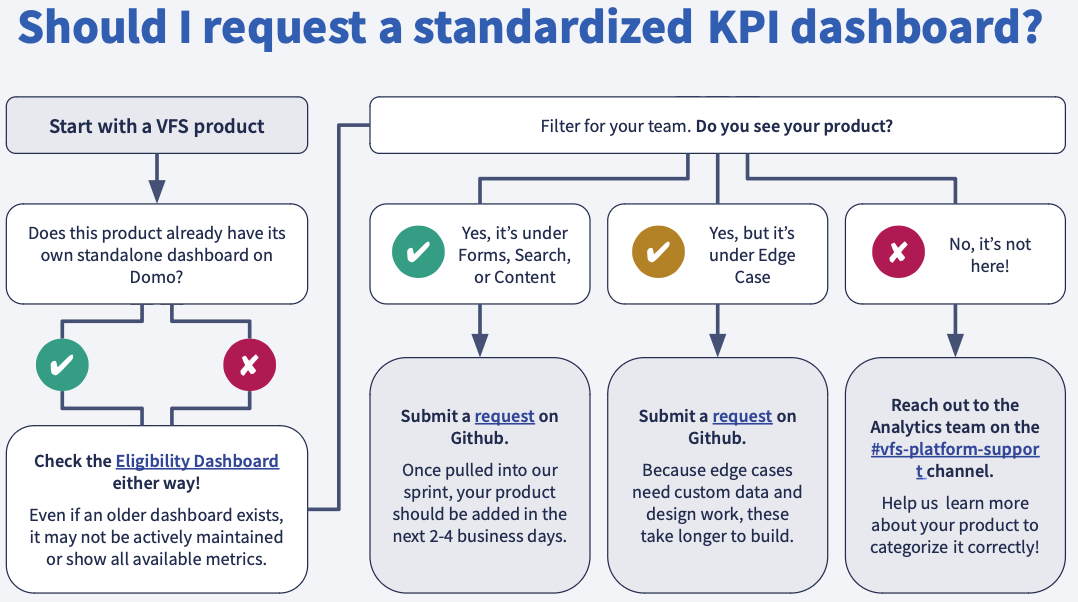
See a full list of products already supported on the three VA.gov KPI dashboards. To have a product added, view the Should I request a standardized KPI dashboard screenshot below. Additionally if you'd like access to the orientation slide deck, reach out to our team.
How is web usage data collected for my product?
Google Analytics is the reporting platform where we can see interactions across VA.gov. The VA uses the paid tier for Google Analytics, which offers a higher tier of data collection that we use to measure success.
Google Tag Manager is a tool where analytics users can control what information is sent to Google Analytics. It is implemented by a JavaScript snippet across all pages of VA.gov. The Platform Analytics & Insights team collaborates with front-end engineers to create a set of dataLayer event requirements. Google Tag Manager manages these tracking events and ultimately communicates this data to Google Analytics and Domo (via a daily export to BigQuery).
How is website interaction tagging implemented? What if I need to make changes?
Tagging is implemented through Google Tag Manager and JavaScript.
If you need to make changes or create additional tags, you can request tagging implementation and QA. Platform Analytics & Insights will work with your team throughout the tagging process.
Some interactions - like PDF downloads or outbound links - are automatically tracked via Google Tag Manager. However, most interactions on VA.gov are communicated deliberately via the dataLayer as JavaScript objects. Ideally, this is not done manually in your application, but rather automatically via individual UI components or through shared tagging. Some analytics implementations - especially at the component library level - may require changes to both the component and the receiver application on VA.gov.
Google Analytics implementation and tagging can be requested by filling out a GitHub ticket.
What self-service tools can Analytics help me get access to?
Platform Analytics & Insights provides access to the following analytics reporting tools:
-
Domo aggregates data from Google Analytics, Medallia, Contact Centers, and other data platforms. Platform Analytics & Insights provides standardized KPI dashboards for Forms, Search, and Content VFS products that prioritizes the metrics that VA cares about.
-
Google Analytics allows you to do more granular analysis on user interactions and create custom dashboards.
What is opting out of analytics on VA.gov? How do I opt-out?
To best separate our product team's activity from veterans, their families, and other users of VA.gov, we ask all product teams and other internal VA staff to opt-out of tracking in their device browsers.
Please take a minute to visit this link on any desktop, smartphone, or tablet browser that you might use to test on the production site:
Learn more about how this opting out works.
What additional analytics resources should I get started with?
To get started with analytics on VA.gov, please use the following additional resources:
I have more questions! What’s the quickest way to reach the Analytics team?
Ask questions or get support using the #vfs-analytics Slack channel.
Help and feedback
-
Get help from the Platform Support Team in Slack.
-
Submit a feature idea to the Platform.