

Last Updated:
This document aims to provide clear guidelines on how to handle, communicate, and respond to incidents.
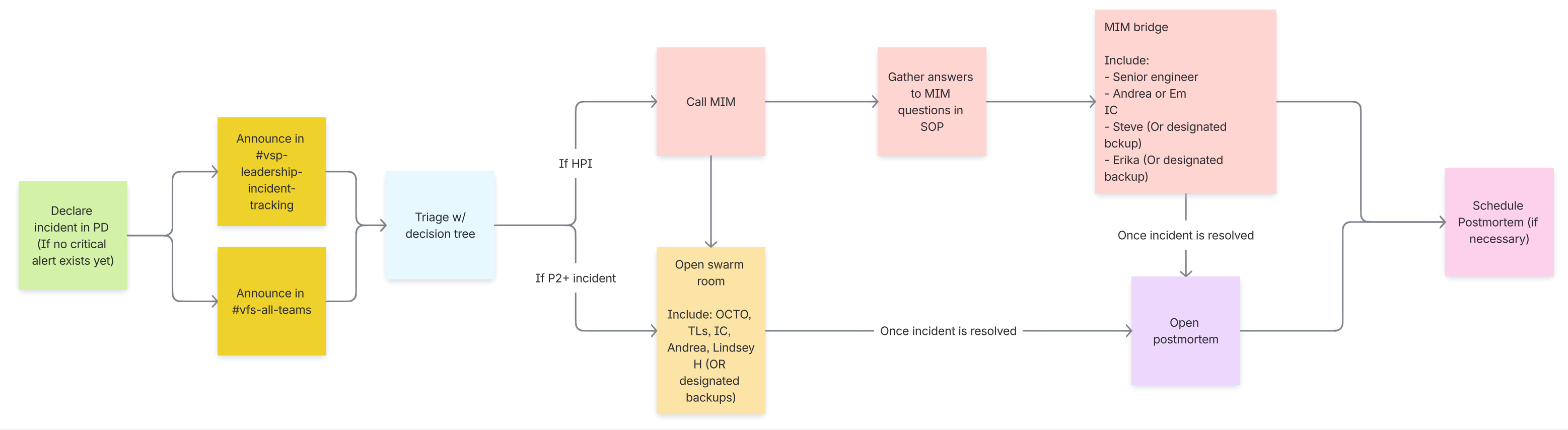
Note: An overview of the process can be found below, under “Incident Flow Chart”
Security Incidents
PII Leaks or Spills
All security incidents must be reported to the ISSO(Christopher.Massey5@va.gov or 214-457-2426) or the Privacy Office (oitprivacy@va.gov) immediately. Be sure to include the following information:
-
Who was involved in the issue (including your contact information)
-
Exactly when the issue occurred (a timeframe, if available)
-
What systems were affected
-
When the issue was discovered, and who discovered it.
-
How many individuals are affected
-
Types of information leaked, if applicable (SSNs, login credentials, names, addresses, etc).
The Privacy Officer or the ISSO creates a ticket in PSET (Privacy Security and Events Tracking System) https://www.psets.va.gov/. (This ticket is not created by anyone on the Platform)
All incidents will be reported to the VACSOCIncidentHandling@va.gov by the ISSO or the PO within 1 hour of occurrence.
Please include the following people on the email chain: Lindsey.Hattamer@va.gov, lindsay.insco@va.gov, jason.day1@va.gov, erika.washburn@va.gov, kelly.argyros@va.gov, andrea.townsend2@va.gov
You can track incidents in the DSVA #vfs-incident-tracking channel
VA Platform Process
These steps are an overview for reporting a PHI/PII spill to Platform.
Leaked API Keys
The Vets API and Vets Website repositories are public, VA owned repos that are hosted on GitHub. Many of the external services we interact with require API keys for authentication. During local development, it’s common to temporarily embed these keys in the code. However, this practice can lead to accidental exposure of sensitive keys if committed to source control. This section will explain the Incident Commanders role on handling these types of incidents.
Types of API Keys
API keys can include private keys, OAuth tokens, Bearer tokens, and more. These credentials are often used for authentication and authorization when interacting with external services on the VA Network or adjacent APIs (such at Lighthouse).
Response Plan
Leaked API keys are often discovered during PR reviews, where a reviewer (Platform or VFS) may notice sensitive information committed in code. Upon identifying a leaked key, follow the Incident Commander process:
-
Trigger an incident in PagerDuty, and escalate to Backend on-call. Or, if during business hours utilize Backend support.
-
Notify OCTO leadership in the #vfs-incident-tracking channel.
-
After the key is rotated, Backend will need to roll pods in EKS to ensure they pick up the new key.
Important note on downtime: Revoking the compromised key may cause downtime or disruptions to services that rely on it, until the new key is in place. To minimize impact, ensure any configuration files, environment variables, or secret management values are updated as soon as possible with the new key.
-
For external services integrations using the Breakers middleware pattern, an outage can be force triggered to manage disruptions. This mitigation strategy will additionally require scheduling a maintenance window in PagerDuty and may also involve placing a temporary banner on the frontend to notify users about the service impact.
-
If Rotation is delayed, please see the next section.
-
Again, this may result in downtime until a new key can be integrated.
-
If you feel comfortable, you can follow triggering Breaker outages for EKS Environments. If not, you can tap the Backend engineer to help with this. This follows the first bullet point in the warning panel above.
-
Using the list from
bundle exec rake breakers:list_services, you can cross-reference this with the Service Directory in PagerDuty. We will want to setup maintenance windows for any of the affected services. -
Reach out to the Content and Information Architecture team in the #content-ia-centralized-team to facilitate setting up a banner on the frontend to inform users about service impact.
-
After the incident has been resolved, create a postmortem to document the incident.
Incident-handling steps
:announcement: These steps are an overview. See further down the page for more details if needed.
-
Determine if the issue is a major outage of va.gov or a limited impact incident, if possible. See Classifying the Incident section below.
Minor incidents don’t need to follow the reporting outlined on this page.
-
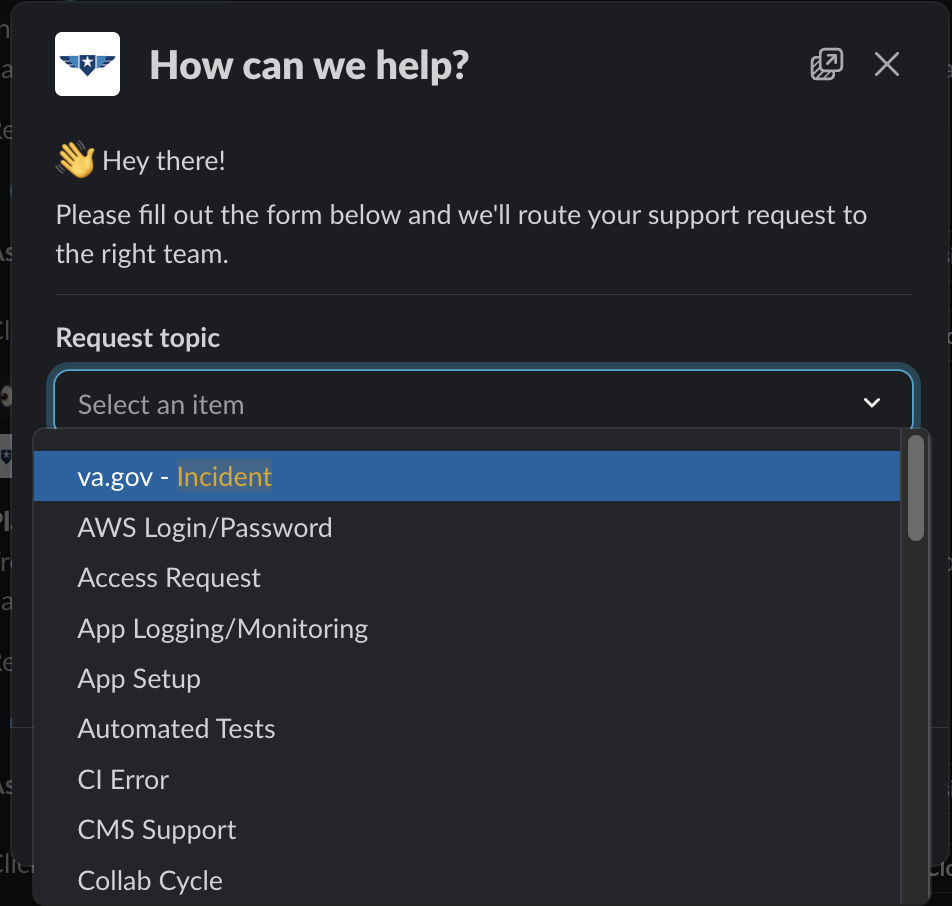
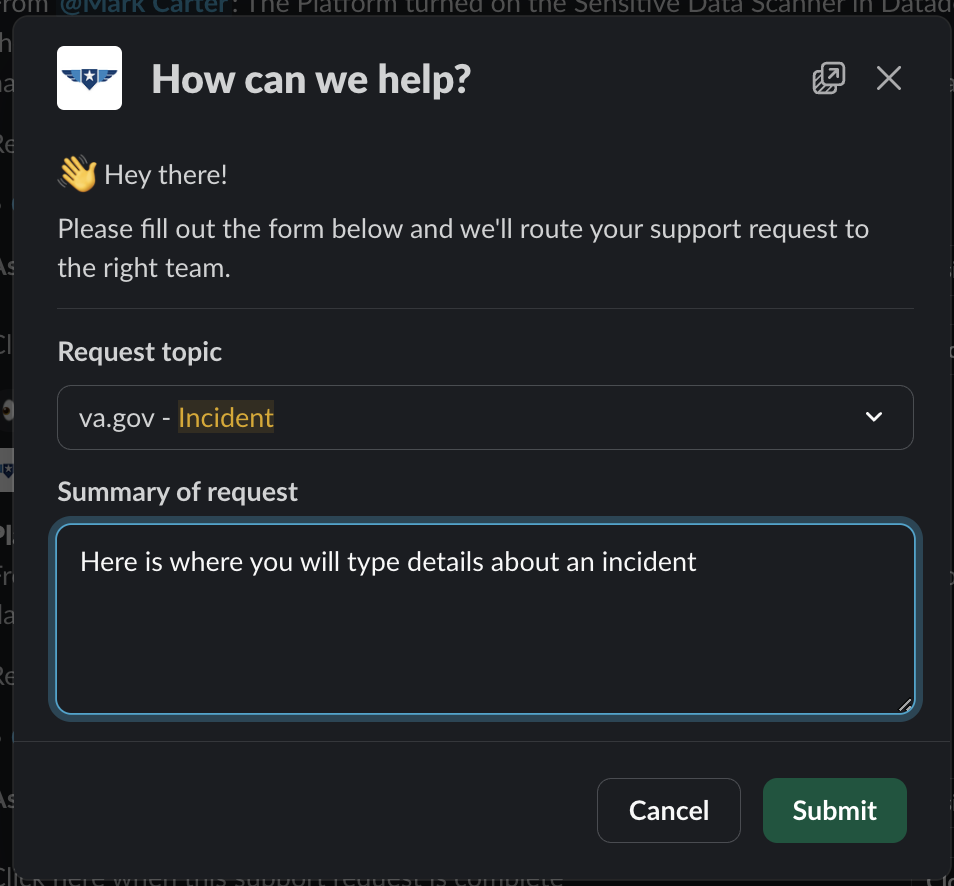
If you are NOT the Incident Commander (IC) and need to page the IC, create a support ticket in the DSVA Slack channel, #vfs-platform-support by using the
/supportcommand and use theincidenttopic.
How to use the /support command
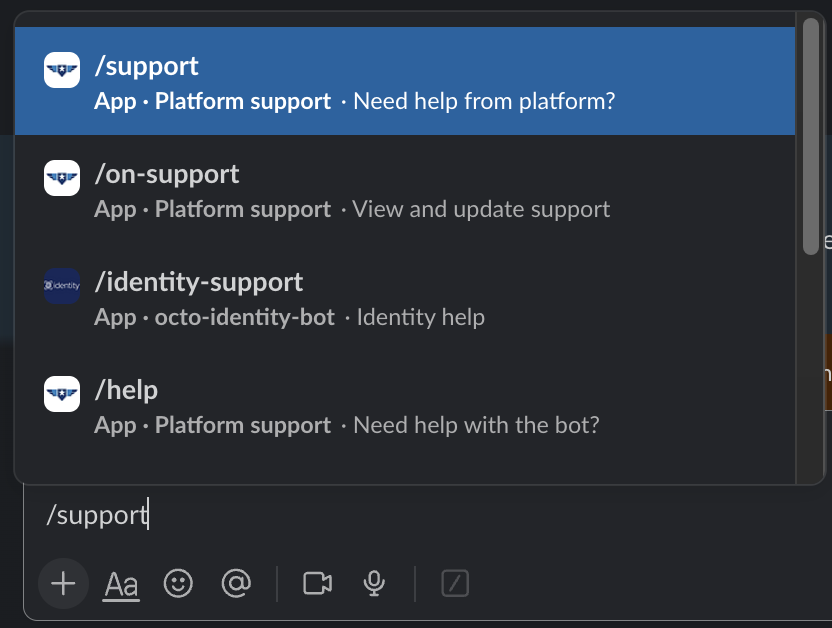
Use the "Incident" topic
Where to add a description in a support ticket
-
The Incident Commander will confirm the incident.
-
For major incidents, the IC must notify @channel and @platform-leadship on significant status change or every three hours in the following channels:
-
For security incidents, the IC must escalate the incident to Tier 3 (Lindsey Hattamer and Jason Day). Follow the steps in the “Security Incidents” section
-
-
The Incident Commander and subject matter experts work together.
-
The engineer will focus on resolving the incident (see Triaging an Incident section below).
-
A technical lead will act as the SME for issues related to the incident.
-
The Incident Commander will focus on the communication steps outlined in this document Please review the difference between a Swarm Room and a MIM Bridge
-
-
Classify the incident and escalate if needed.
-
Start a Team Swarm Room if required.
-
-
Provide updates in incident threads in the above channel as more details emerge.
-
Once the Incident is resolved, publish a postmortem.
Triaging an Incident
Triaging an incident in the VA Platform can be difficult due to the complexity of the systems, teams, and infrastructure involved. The following suggestions are steps that may be taken by the IC or Tier 2 on-call engineers when troubleshooting.
Take notes and document the troubleshooting steps taken in the Slack thread or channel where this is being discussed.
Note: ✔️ Denotes an action to take when triaging an incident.
⬇️ Click below for triaging steps ⬇️
Incident Areas of Concern
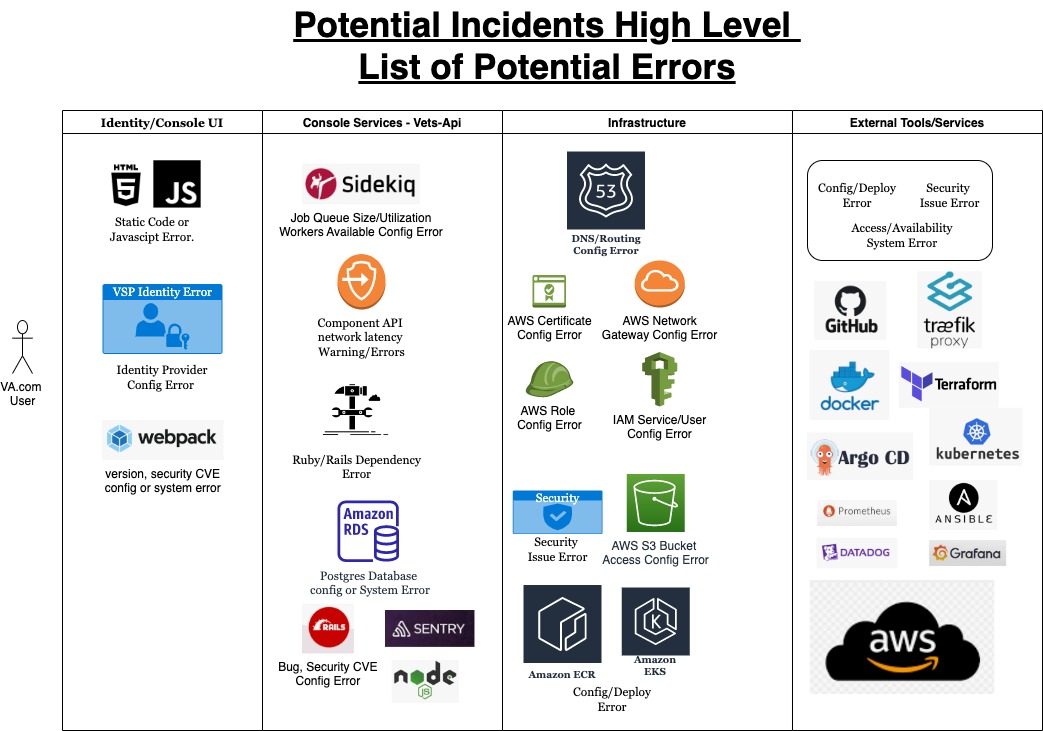
Classifying the Incident
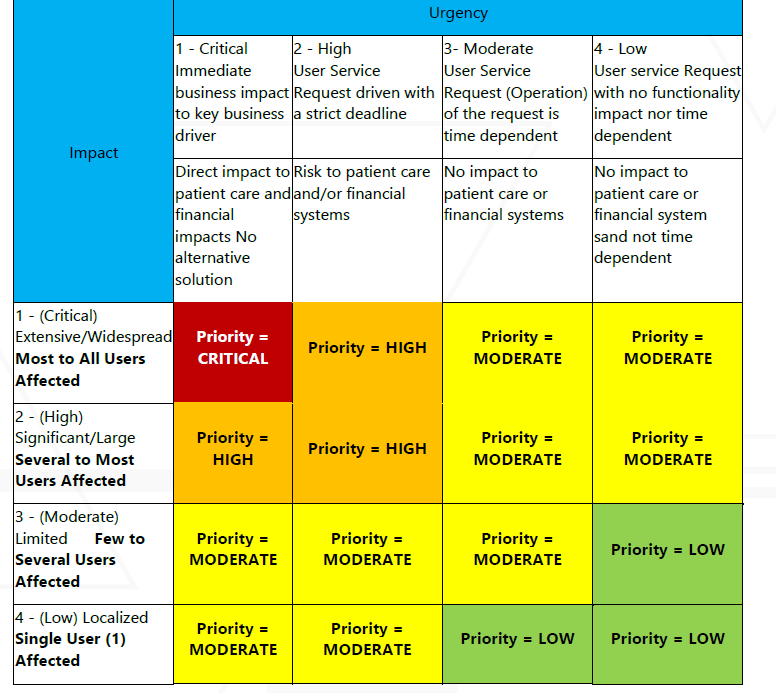
The first step to take when an incident occurs is to classify it based on impact and severity. Incidents are handled differently, depending on how many users are affected and whether significant functionality is lost on va.gov.
This rubric provided by the VA MIM team
|
Severity |
Description |
Urgency |
|---|---|---|
|
Critical |
|
Drop everything and work around the clock to fix the issue. Incident Commander should immediately open a Swarm Room and consider contacting the MIM team for an HPI declaration |
|
Major (High) |
|
Drop everything and try to get the issue fixed ASAP. Incident Commander should immediately open a Swarm room and consider contacting the MIM for an HPI declaration. Clarify need for MIM with OCTODE leadership |
|
Medium (Moderate) |
|
Try to fix the problem ASAP. Incident Commander should offer to open up a Swarm Room, but may not be necessary. |
|
Minor (Low) |
|
Try to fix the problem ASAP, but not necessarily evenings and weekends. |
|
External |
|
|
|
Not an Incident |
|
|
Designating an event as an Incident, including ones designated as Minor, indicates the seriousness of the issue. The Platform has a sense of urgency around resolving all Incidents.
High Priority Incidents (HPI) and Major Incident Management (MIM)
If you believe this is a high priority incident (HPI) based on the above criteria, or by using the incident flowchart, please follow the steps in the Major Incident Management Playbook
External Incidents handling
External Incidents are treated differently than internal ones. Some examples might include Datadog or GitHub being down. You can post a message in #vfs-platform-support as you see fit.
Note: The rest of this document focuses on internal Incidents.
Roles
All Incidents must have:
-
Incident Commander
-
Support Team TL: Lindsay Insco
-
TL from the team who owns the broken service: Curt Bonade, Josh Bergman, Ken Mayo (Or designated backup)
-
Program Manager: Andrea Townsend
-
A senior team member (TL or senior) who is not hands-on resolving the issue but can provide clear, timely updates. They must be able to answer questions from the MIM team about the incident and status of resolution. This person should bridge communication between the Swarm Room and the MIM Bridge.
-
This should be a TL or a Senior member of the team (For example, Josh Bergman for IST, or Curt for SRE.)
-
-
Engineering Lead: Lindsey Hattamer (backup: Curt Bonade)
-
VA Technical Leadership: Jennifer Kramer
-
VA Product Leadership: Anthony Nguyen
If you are named as required and you cannot attend, you must designate who your backup is in the Platform Leadership channel in slackmmander (IC)
Communication
Communication is the main job of the incident commander.
As a rule, no escalation is needed for minor incidents but the IC can choose to escalate at their discretion.
For ease of use, please use the @platform-leadership slack group when tagging an incident as this will include all leadership that should be notified of OOB and Incidents.
Slack
After notifying the channels listed in above in the Incident-handling steps section, communication should happen at least hourly in the #vfs-incident-tracking channel.
The IC’s job is to keep Leadership updated with the current status of an active incident at least every hour with the following:
-
The current state of the service
-
Remediation steps taken
-
Any new findings since the last update
-
Theory eliminations (i.e. ‘What have we determined is not the cause?’)
-
Anticipated next steps
-
ETA for the next update (if possible)
If OCTODE Platform Leadership is not reachable on slack, text them one at a time - beginning with Jennifer Kramer - using the phone number from their slack profile.
-
If Slack is down, use the contact list and info in PagerDuty.
Swarm Room and MIM Bridge
Please follow the guide on Swarm Rooms vs MIM Bridges for more information on rules and etiquette.
External VA Service Outages/Incidents
If an issue with an external VA service is detected (TIC, MPI, BEP, VBMS, etc) you will need to file a Service Now (SNOW) ticket. The Incident commander should assist in filing this.
How to file a SNOW ticket in yourit.va.gov for users without ITIL access
-
From behind the VA network, go to http://yourit.va.gov/va to get to your favorite page.
-
Select “Report an issue”
-
Select “Not sure? Submit your issue here”
-
Fill out your general information and select “Next page”
-
Name, #, email, etc
-
-
Brief description: 1 sentence max
-
Is this happening at a VA location? No
-
VA location: Anywhere
-
Category: Software
-
Subcategory: Web (IMPORTANT: Check the box that says “This device I am looking for is not on the list)
-
Name: http://va.gov
-
URL : Whatever one is non-responsive
-
Click “Further Details”
-
Select impact.
-
Submit issue. You will get a ticket number. Something like INC123456. Look out for communication via Teams, email, and your phone.
How to file a SNOW ticket in yourit.va.gov for users with ITIL access
-
When you open up http://yourit.va.gov you will be sent to a different dashboard
-
Select “All”, type “incident” into the filter box (Or scroll all the way down I guess) and “Create New”
-
You will get a ticket number immediately, even before you submit it. Copy this number.
-
Location doesn’t matter, building and room are N/A, fun stuff etc etc. Default to DC or your nearest VAMC
-
Category: Always affected Service
-
Affected Service: If you don’t know, use http://VA.gov .
-
Portfolio: Veteran Experience Services (usually works)
-
Assignment group
-
If you do NOT know. Go with “ESD Tier 1” - they will help you get to the right person.
-
-
Affected System Name/EE Number/Hostname : VA.gov
If an issue with the TIC gateway is identified, the team has been encouraged to reach out to Ty Allinger - a Network Edge Operations engineer directly on Teams to attempt to troubleshoot live. If Ty Allinger is out of office, Lawrence Tomczyk is the backup manager after you file an Incident Ticket and assign it to NETWORK.NOC.NEO
Out-of-Band (OOB) Deployment - Approval Overview
Out-of-Band (OOB) deployments are used for emergency situations where a fix must be deployed outside of the normal deployment schedule.
As a rule, OOB deployments require approval from OCTO-DE Platform staff before proceeding.
When an OOB Deployment is Requested
If you are asked to perform an OOB deployment:
-
Direct the requester to complete the OOB process
-
Have them follow the official OOB process here
-
-
Ensure a request has been created
-
A Slack support request in
#vfs-platform-support -
A corresponding OOB deployment request issue
-
-
Escalation and Approval
-
Tier 1 will assess the issue and determine if escalation is required
-
If needed, PagerDuty will be triggered to notify OCTO-DE Platform staff
-
OCTO-DE Platform staff will approve or deny the deployment
-
-
Deployment Execution
-
Once approved, Platform Support coordinates the deployment with the appropriate team
-
-
Postmortem Requirement
-
A postmortem must be completed within two business days of the incident.
-
Off Hours Deployments (OHD) are not the same as Out-of-Band (OOB) deployments.
OHD is for planned, non-urgent deployments outside normal deploy windows, coordinated with Platform Support to reduce risk and minimize impact to Veterans.
After the Incident
Once the Incident is resolved, follow the instructions to create a postmortem document. Get a draft up within 24 hours.
Incident Retrospective Process
OCTODE leadership may request that the Incident Commander schedule a retrospective meeting to bring all relevant parties together and discuss the Post Mortem (PM) while it is still in draft form. The intent of the meeting is typically to review and go through the details of the PM.
The postmortem document should be as complete as possible prior to the discussion. This should be treated as a call to cover the final draft.
Responsible Party
-
The team that owned the incident resolution facilitates the postmortem (PM) meeting and sends the meeting invitations. For Platform incidents, this is typically the Incident Commander (IC).
-
The meeting is hosted by the team that owned the incident resolution; if the incident was caused by an external service, Platform Support hosts the PM meeting.
Required Participants
The PM meeting invite must include the following using VA.gov email addresses only:
-
Dave Conlon
-
Jennifer Kramer (required reviewer for Postmortem PRs)
-
Lindsey Hattamer
-
Lindsay Insco
-
Andrea Townsend
-
Anthony Nguyen
-
Any additional stakeholders involved in or impacted by the incident
You may forward the invite to your company email for visibility, but all official participants must be invited via VA.gov email.
Scheduling Guidance (Dave Conlon & OCTO Leadership)
Dave Conlon’s attendance is important for incidents he requests review on (e.g., HPIs).
-
Schedule the meeting only after the postmortem is substantially complete.
-
Coordinate with all required participants to find a time that works for everyone, ensuring Dave and other key stakeholders can attend.
-
Contact Julia Gray or Erica Robbins via Slack for help booking time on Dave’s calendar.
Meeting Platform & Invite Instructions
-
Microsoft Teams is the required meeting platform for PM calls.
-
The meeting invite description must include:
-
A link to the postmortem document
-
A short explanation of the meeting purpose
-
Example:
This meeting is a retrospective to review and finalize the attached postmortem. Please reach out if there are additional discussion topics or attendees we should include.
Suggested Agenda (Host Guide)
To keep the meeting efficient, consider including an agenda based on the titled topics from the PM. This can serve as a guideline to help facilitate the discussion:
-
Summary – Recap of the incident and involved teams
-
Impact – Users affected, duration, and SLO impact
-
Event Timeline – Walk through the timeline chronologically
-
Root Cause Analysis – What happened, why it happened (failed or missing mitigations)
-
Resolution – Steps taken to resolve the incident; links to #oncall or related conversations
-
What Went Well / What Went Wrong / Where We Got Lucky – Validate learnings
-
Action Items – Review all action items; confirm owning teams and issue links; identify any missing follow-ups
Facilitation Guidance for the Host
During the call:
-
Share the postmortem document link in chat at the start of the meeting
-
Share your screen with the postmortem open
-
Walk through the document section-by-section, pausing for discussion
-
Keep discussion focused on accuracy, clarity, and improvement (not blame)
-
The IC or another member of the Platform Support team should be working to take detailed notes so that the document can be updated.
Action Items & Post-Meeting Steps
-
Update the postmortem with notes and corrections from the discussion.
-
Ensure all agreed-upon action items are listed in the postmortem action item table.
-
Convert any action items requiring tracking into issue tickets as soon as possible after the meeting.
-
Move the document out of draft mode.
-
Request review from Steve Albers.
Incident Flow Chart
Resources
Incident Call Rules: Swarm Room vs. MIM Bridge
MIM SOP (Only accessible behind VA network [CAG, AVD, GFE])
YourIT Helpdesk Article (Only accessible behind VA network [CAG, AVD, GFE])